Threads credentials
Added in version 2.0: Threads platform support added to Agoras with OAuth 2.0 authentication.
Agoras needs the following OAuth app credentials to access the Threads API:
App ID (Meta Developer App ID)
App Secret (Meta Developer App Secret)
Redirect URI (OAuth callback URL)
Threads uses Meta’s Developer Console (same as Instagram and Facebook), so you’ll need a Meta Developer account and a registered app with Threads API access.
Important: Threads API may require business account verification and app review for production use. Some features like analytics/insights may require additional permissions or business account status.
Prerequisites
Before setting up Threads credentials, you need:
A Meta (Facebook) Developer account
A Meta Business account (for production use and advanced features)
A registered Meta app with Threads API product enabled
OAuth redirect URI configured
Create a Meta Developer Account
If you already have a Meta Developer account, skip to “Create a Meta App”.
Go to My Apps.
Click “Get Started” or sign in with your Facebook account
Complete the developer registration: - Accept Meta’s Developer Terms - Verify your account (may require phone number) - Complete your developer profile
Create a Meta App
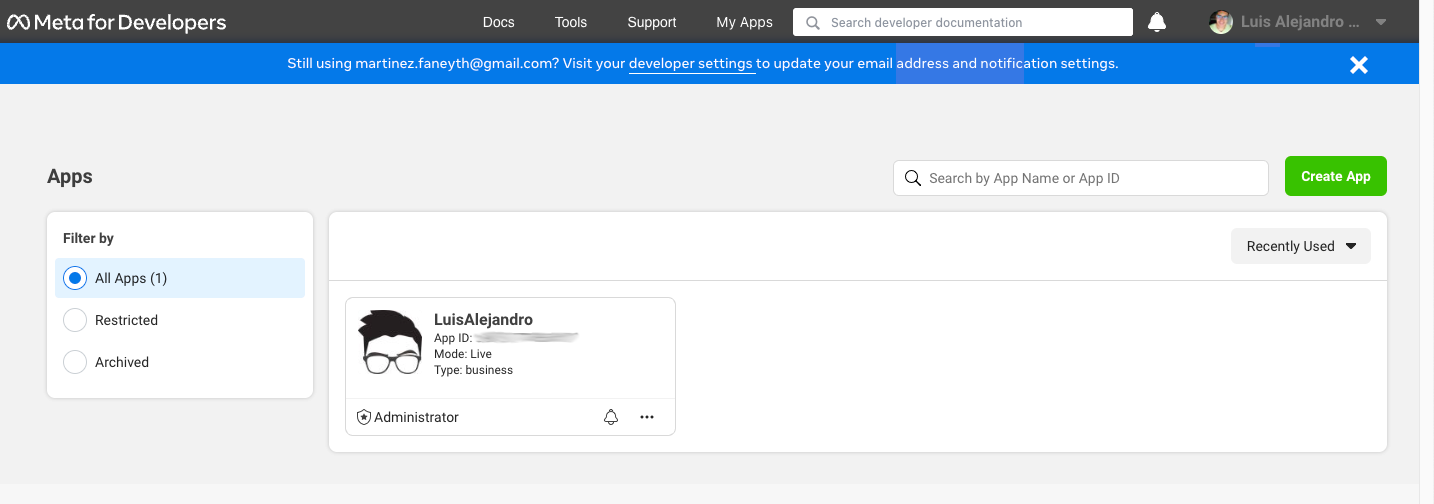
Go to My Apps.
Click “Create App” or “Add App”
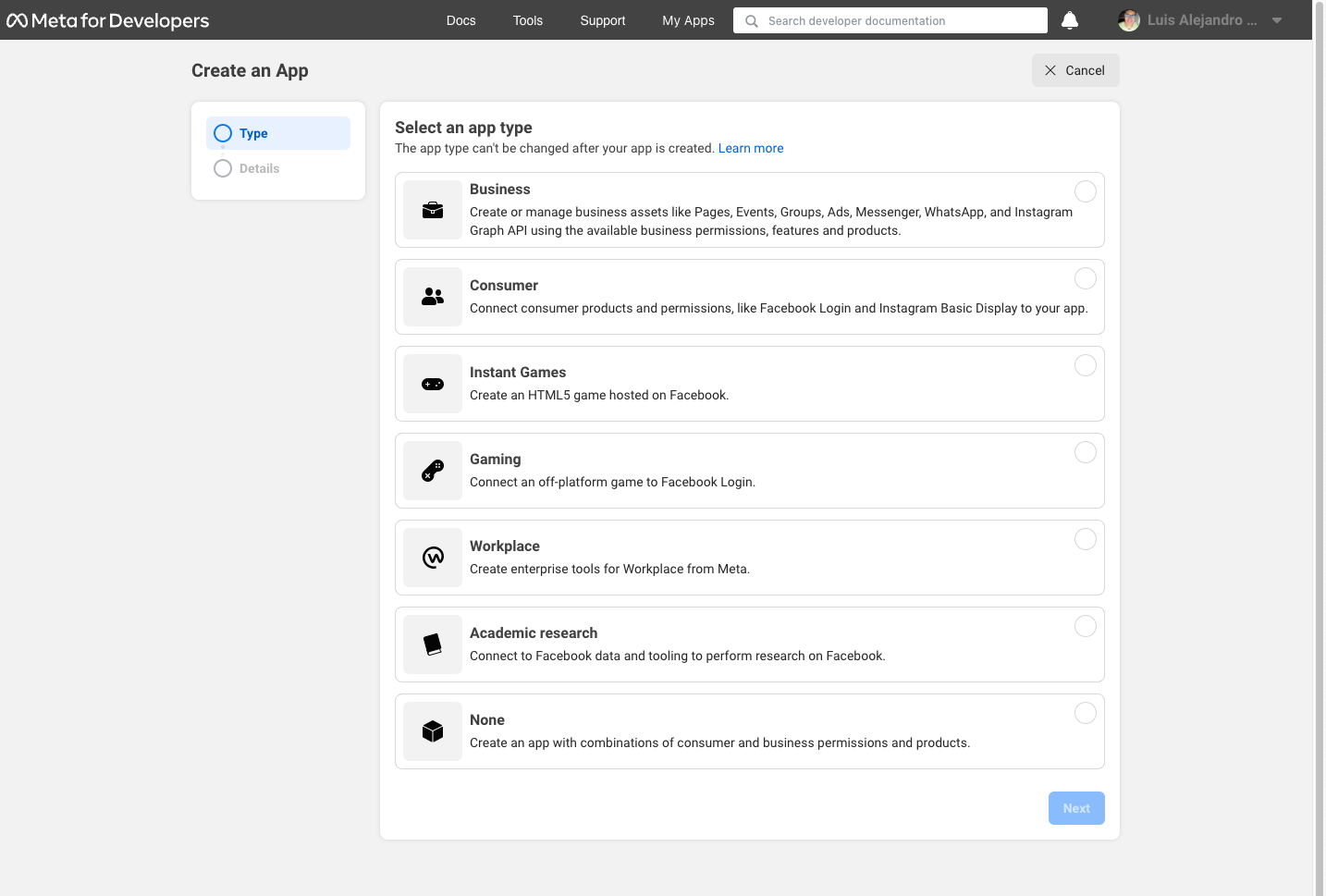
Select app type: - Choose “Business” for most use cases - Choose “Other” if Business doesn’t fit your needs
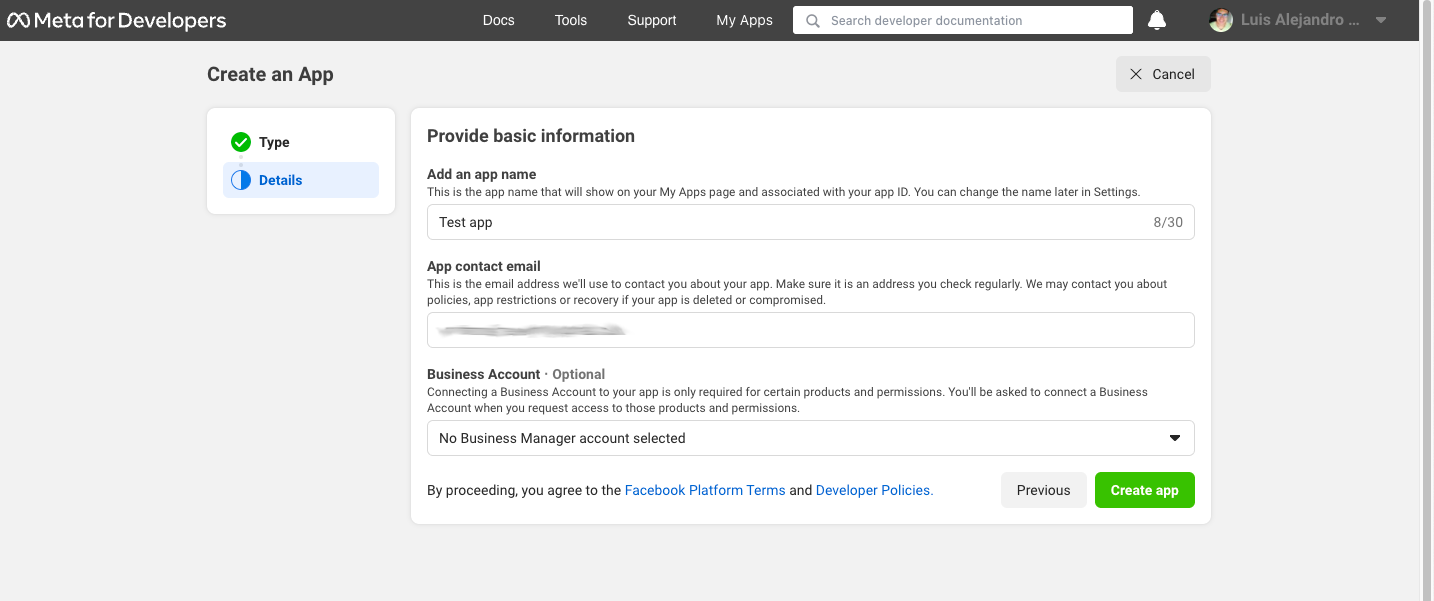
Fill in the app details: - App Name: Choose a descriptive name (e.g., “My-App-Agoras-Threads”) - App Contact Email: Your contact email - Business Account (optional): Link to a Meta Business account if you have one
Add Threads API Product
After creating your app:
In your app dashboard, go to Products or click “Add Product”
Find “Threads” in the product list
Click “Set Up” on the Threads product
Review and accept the Threads API terms
The Threads API product provides access to: - Post creation (text, images, videos) - Reply functionality - Repost/share functionality - Analytics and insights (may require business account) - Reply moderation
Configure OAuth Settings
In your app dashboard, go to Settings > Basic
Add your OAuth redirect URI: - Click “Add Platform” if needed - Select “Website” - Add redirect URI:
https://localhost:3456/callback
Note
The redirect URI is fixed to https://localhost:3456/callback.
Save changes
Get App Credentials
In your app dashboard, go to Settings > Basic
Note your App ID (this is your
--app-id)Note your App Secret: - Click “Show” next to App Secret - Copy the secret (this is your
--app-secret) - Keep this secret secure! Never commit it to version control
Business Account Setup (Optional but Recommended)
For production use and advanced features (like analytics), you may need a Meta Business account:
Create Business Account (if you don’t have one): - Go to https://business.facebook.com/ - Create a new business account or use an existing one - Complete business verification if required
Link Business Account to App: - In your app dashboard, go to Settings > Basic - Under “Business Account”, link your business account - This enables business features and may be required for app review
Verify Business Account: - Follow Meta’s business verification process - This may require business documentation - Verification can take several days to weeks
App Review Process
Development Mode: - Available immediately after app creation - Limited to your own account and test users - Good for testing and development - Some features may be restricted
Production Mode: - Requires app review and approval - Can access all authorized accounts - Full API functionality - Required for live/production usage
To submit for app review:
Complete all required app information in App Review > Permissions and Features
Provide detailed use case description
Submit privacy policy and terms of service URLs (if required)
Create a screencast or video demonstrating your app’s use of Threads API
Submit your app for review
The review process typically takes 1-2 weeks. During review, you can continue using your app in development mode.
CI/CD Setup (Unattended Execution)
For CI/CD environments where interactive browser authorization isn’t possible, you can skip the authorize step entirely and provide all required credentials via environment variables.
Run
agoras threads authorizelocally first to generate a refresh token (one-time setup)Extract the refresh token using the tokens utility command:
# First, list tokens to find the identifier (if you don't know it)
agoras utils tokens list --platform threads

# Then view all stored credentials
agoras utils tokens show --platform threads --identifier {identifier}
Set all required environment variables in your CI/CD pipeline:
export THREADS_APP_ID="your_app_id"
export THREADS_APP_SECRET="your_app_secret"
export THREADS_REFRESH_TOKEN="your_refresh_token_here"
export THREADS_USER_ID="your_user_id"
Run Agoras actions directly without running
authorize. All credentials will be loaded from environment variables.
Note: For unattended execution, you must provide all required credentials. The refresh token alone is not sufficient - you also need app ID, app secret, and user ID as shown in the Platform Arguments and Environment Variables Reference documentation.
Development vs Production
Development Mode: - Available immediately after app creation - Limited to your own Threads account - Can test all basic Agoras actions (post, video, share, delete) - May have rate limiting restrictions - Good for testing integration
Production Mode: - Requires app review and approval - Can post to any authorized account - Full API functionality - Higher rate limits - Required for live usage - Analytics/insights may require business account
Agoras parameters
Threads credential |
Agoras parameter |
|---|---|
App ID (Meta App ID) |
–app-id |
App Secret (Meta App Secret) |
–app-secret |
Refresh Token (auto-managed) |
–threads-refresh-token |
Environment Variables:
Note: After authorization, refresh tokens are managed automatically by Agoras. You no longer need to provide tokens for actions.
Troubleshooting
“App not approved” error: - Make sure your app has been submitted for review (if using production features) - Check if you’re trying to use production features in development mode - Verify all required app information is complete - Ensure Threads API product is enabled in your app
“Invalid credentials” error: - Double-check your App ID and App Secret - Make sure you’re using the correct app credentials - Check that Threads API product is enabled
“Authorization failed” error: - Make sure you’re logged into the correct Facebook/Threads account - Check that your app has the required permissions/scopes enabled - Try the authorization process again - Clear browser cache and cookies if issues persist
“Business account required” error: - Some features (like analytics) may require a verified business account - Link your business account to the app in app settings - Complete business verification process if not already done - Check Meta’s documentation for feature-specific requirements
“Rate limit exceeded” error: - Threads API has rate limits that vary by account type - Wait before retrying the request - Consider implementing exponential backoff in your automation - Check Meta’s rate limit documentation for your account type
“Token expired” error:
- Agoras should automatically refresh tokens, but if this fails:
- Re-run agoras threads authorize to get a new token
- Check that your app credentials are still valid
- Verify your app hasn’t been disabled or restricted
For more help, consult the Meta Threads API documentation or report issues at https://github.com/LuisAlejandro/agoras/issues.