Usage for Facebook
Note
Agoras uses agoras facebook for Facebook operations.
See the migration guide for upgrading from agoras publish.
Facebook is a social network that allows you to share text, images and videos with your friends, family and followers. Agoras can publish posts, like posts, share posts and delete posts on Facebook by using a popular Facebook Graph API client.
Required Credentials
Before using Agoras with Facebook, you’ll need to manually extract the following credentials from your Facebook App in the Meta Developer Console. These credentials are required for OAuth 2.0 authentication.
Client ID (
FACEBOOK_CLIENT_ID): Your Facebook App ID, used as the OAuth client identifierClient Secret (
FACEBOOK_CLIENT_SECRET): Your Facebook App Secret, used for OAuth authenticationApp ID (
FACEBOOK_APP_ID): Your Facebook App ID (same as Client ID)Object ID (
FACEBOOK_OBJECT_ID): The ID of the Facebook page, profile, or group you want to post to
See Facebook credentials for detailed instructions on how to create a Facebook App and obtain these credentials.
Available Actions
authorize- Set up OAuth 2.0 authentication (required first step)post- Create text and image posts (up to 4 images)video- Upload videoslike- Like postsshare- Share posts to your profiledelete- Delete your own posts
Post to Facebook
New format:
agoras facebook post \
  --object-id "${FACEBOOK_OBJECT_ID}" \
  --text "${STATUS_TEXT}" \
  --link "${STATUS_LINK}" \
  --image-1 "${IMAGE_URL_1}" \
  --image-2 "${IMAGE_URL_2}"
Note
You must run agoras facebook authorize first before using this command.
Changed in version 2.0: Parameters simplified: --text instead of --status-text, --image-1 instead of --status-image-url-1
Note
If you add a link using --link and also add images, the images may be ignored depending on Facebook’s API behavior.
Upload a Video
New format:
agoras facebook video \
  --object-id "${FACEBOOK_OBJECT_ID}" \
  --video-url "${VIDEO_URL}" \
  --video-title "${VIDEO_TITLE}" \
  --video-description "${VIDEO_DESCRIPTION}"
Note
You must run agoras facebook authorize first before using this command.
Like a Post
This command will “like” a post identified by --post-id (read about how to get the id of a post here).
Note
You must run agoras facebook authorize first before using this command.
New format:
agoras facebook like \
  --post-id "${FACEBOOK_POST_ID}"
Delete a Facebook post
This command will delete a post identified by --post-id that is currently published on --object-id (read about how to get the id of an account here).
Note
You must run agoras facebook authorize first before using this command.
New format:
agoras facebook delete \
  --object-id "${FACEBOOK_OBJECT_ID}" \
  --post-id "${FACEBOOK_POST_ID}"
Post the last URL from an RSS feed into Facebook
This command will parse an RSS feed located at --feed-url, and publish the last --max-count number of entries published in the last --post-lookback number of seconds. The post content will consist of the title and the link of the feed entry. The post will be published on --facebook-object-id (read about how to get the id of an account here).
Note
You must run agoras facebook authorize first before using this command.
Please read about how the RSS feed should be structured in the RSS feed section. This ensures that the feed is correctly parsed and that the post content is properly formatted.
agoras utils feed-publish \
      --network "facebook" \
      --mode "last" \
      --facebook-object-id "${FACEBOOK_OBJECT_ID}" \
      --feed-url "${FEED_URL}" \
      --max-count "${MAX_COUNT}" \
      --post-lookback "${POST_LOOKBACK}"
Post a random URL from an RSS feed into Facebook
This command will parse an RSS feed at --feed-url and publish one random entry that’s not older than --max-post-age. The post content will consist of the title and the link of the feed entry. The post will be published on --facebook-object-id (read about how to get the id of an account here).
Note
You must run agoras facebook authorize first before using this command.
Please read about how the RSS feed should be structured in the RSS feed section. This ensures that the feed is correctly parsed and that the post content is properly formatted.
agoras utils feed-publish \
      --network "facebook" \
      --mode "random" \
      --facebook-object-id "${FACEBOOK_OBJECT_ID}" \
      --feed-url "${FEED_URL}" \
      --max-post-age "${MAX_POST_AGE}"
Google Sheets Scheduling
Agoras can schedule Facebook posts using Google Sheets. This allows you to plan and automate post publishing.
Run Scheduled Messages
Process scheduled messages from a Google Sheet:
agoras utils schedule-run \
  --network facebook \
  --sheets-id "${GOOGLE_SHEETS_ID}" \
  --sheets-name "Facebook" \
  --sheets-client-email "${GOOGLE_SHEETS_CLIENT_EMAIL}" \
  --sheets-private-key "${GOOGLE_SHEETS_PRIVATE_KEY}" \
  --facebook-object-id "${FACEBOOK_OBJECT_ID}"
Note
You must run agoras facebook authorize first before using this command.
Sheet Format
Your Google Sheet should have the following columns:
status_text: Post text contentstatus_link: URL to include in poststatus_image_url_1throughstatus_image_url_4: Image URLs (optional)date: Scheduled date (format: DD-MM-YYYY)hour: Scheduled hour (format: HH, 24-hour format)state: Post state (pending,published,error)
Example sheet row:
status_text,status_link,status_image_url_1,status_image_url_2,status_image_url_3,status_image_url_4,date,hour,state
"This is a test facebook post","https://agoras.luisalejandro.org/en/latest/","https://pbs.twimg.com/media/Ej3d42zXsAEfDCr?format=jpg","https://pbs.twimg.com/media/Ej3d42zXsAEfDCr?format=jpg","","","21-11-2022","17","pending"
Scheduling Logic
Posts with
state="pending"and scheduled time in the past are processedPosts are created at the scheduled date and hour
Sheet state is updated to
publishedafter successful postingIf posting fails, state is updated to
errorUse
--network facebookto process only Facebook posts, or omit to process all networks
How to get --facebook-object-id parameter
With Agoras you can use the facebook network to post to pages, profiles and groups, but for simplicity sake we’re going to only explain how to get the object ID of a page.
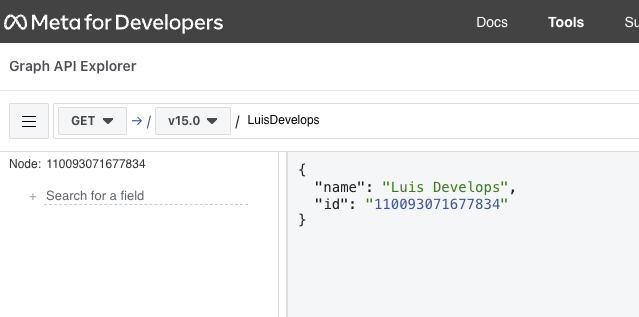
To find your Page ID go to the following URL, replacing {page_name} with the pretty name of your page url. For example, in https://www.facebook.com/LuisDevelops, the {page_name} is LuisDevelops. Put the URL in your browser and hit enter.
https://developers.facebook.com/tools/explorer/?method=GET&path={page_name}
Then click on submit and you’ll see a response like this:
{
      "name": "Luis Develops",
      "id": "ZZZZZZZ"
}
ZZZZZZZ is your page ID.
How to get --facebook-post-id parameter
Extracting from Facebook website
The post ID parameter is necessary to like, share and delete posts. You can extract it from the post URL:
https://www.facebook.com/XXXXX/posts/NNNNNNNNNNN
If NNNNNNNNNNN consists only of numbers, then that’s the post ID. If it contains other characters, then it’s not the post ID and you’ll need to do an extra step.
Copy the entire post URL and paste it in the following URL, replacing {post_url} with the URL you just copied. Put the URL in your browser and hit enter.
https://www.facebook.com/plugins/post.php?href={post_url}
You’ll see a page like the one in the image:

Click on the timestamp of the post (highlighted in red) and you’ll be redirected to a page like this:
https://www.facebook.com/XXXXX/posts/NNNNNNNNNNN
Now you can copy the post ID (NNNNNNNNNNN) from the URL.
Using Agoras
When you create a facebook post with Agoras, it will print the post ID (in json format) in the console. You can copy it from there and use it in other commands. For example:
$ agoras facebook post \
      --object-id XXXXX \
      --text "This is a test post"
$ {"id":"NNNNNNNNNNN"}
NNNNNNNNNNN is the post ID.